Temperature and humidity control in the logistics industry is extremely important to ensure the quality, safety and prolong the shelf life of goods, especially sensitive products such as food, pharmaceuticals and chemicals. If not strictly controlled, these environmental factors can cause significant financial losses for businesses.
GRAPHTEC GL260 10-channel independent data logger with wireless transmission (semiki.com)
Ensure product quality and safety
Food: Improper temperature and humidity are the leading causes of food spoilage, mold and loss of nutritional value. Fresh produce such as fruits and vegetables require high humidity, while nuts require low humidity to avoid spoilage.
Pharmaceuticals: Many medicines and vaccines require storage at precise temperatures and humidity levels to maintain their effectiveness and safety. Even small changes can cause the medicine to deteriorate, posing a health risk to the user.
Chemicals: Some chemicals are susceptible to react or decompose when exposed to improper temperatures or humidity, making them dangerous during transportation and storage.
T&D TR72A2 temperature and humidity data logger 0 ~55°C/10 ~95% RH
Minimize loss and cost
Minimize damage and waste: By maintaining the ideal environment, temperature and humidity control helps to minimize spoilage, product rejection and waste, thereby protecting business assets.
Energy saving: Effectively monitoring and adjusting your warehouse cooling or heating system can help reduce energy costs.
Compliance with regulations and standards
Legal regulations: Many industries, especially pharmaceuticals and food, have strict regulations regarding temperature and humidity during transportation and storage. Compliance helps businesses avoid fines and ensures product acceptance in the market.
Quality standards: Compliance with standards such as Good Manufacturing Practices (GMP) helps maintain product quality and increases brand reputation.
Increasing supply chain efficiency
Extend shelf life: Proper storage helps to extend the shelf life of the product, facilitating storage and transportation over a longer period of time.
Increase visibility: Real-time temperature and humidity monitoring systems (e.g., data loggers or wireless sensors) allow businesses to continuously monitor environmental conditions, ensuring products are properly stored throughout their journey.
Improve performance: When goods are securely stored, circulation processes and warehouse management become more efficient.
T&D TR72A-S data logger | remote temperature and humidity analysis solution | semiki.com
Protection of other goods
In addition to food and pharmaceuticals, temperature and humidity control is necessary for many other types of goods:
Electronic equipment and components: High humidity can cause short circuits and corrosion, while high temperatures can damage sensitive components.
Fabrics and clothing: Humidity control helps prevent mold and fabric damage.
Paper and wood products: High humidity causes paper to mold and warp, while low humidity can cause wood to crack.
In the logistics industry, especially in cold chain and sensitive goods transportation, temperature and humidity data loggers play a very important role. They help monitor, record and analyze environmental conditions during transportation and storage, bringing many practical benefits.
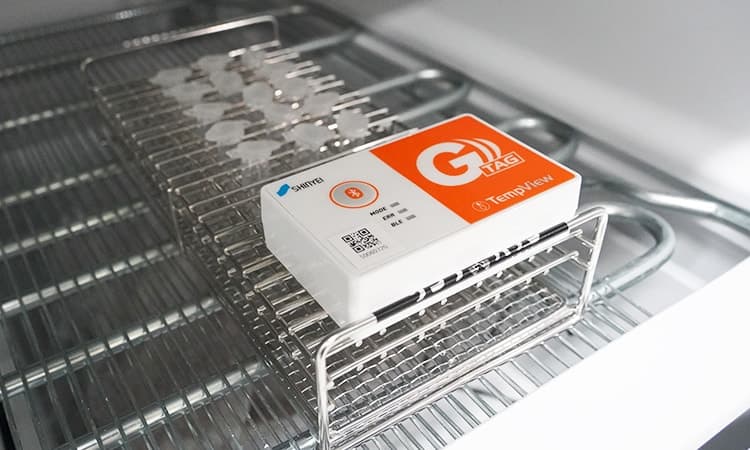
SHINYEI G-TAG (GT002-T) temperature logger for logistics (-40 ~80°C)
The temperature and humidity data logger from Japanese manufacturer T&D can be used in a variety of ways, including connecting via wireless LAN (Wi-Fi), Bluetooth, or USB cable. Below are detailed instructions on how to use it based on these methods.
Method 1: Using via wireless LAN (Wi-Fi) and cloud services
Prepare: Install the “T&D Thermo” app on your phone or tablet.
Wi-Fi Setup: Use the “T&D Thermo” app to connect the TR series device to a Wi-Fi network. You need to do this the first time you use it or when you change networks.
Automatic data download: After connection, the device will automatically upload the recorded temperature and humidity data to the cloud service “T&D WebStorage Service”.
Data access:
Via T&D Thermo app: Open the app on your phone to view real-time data and analytical charts.
Via web browser: Log in to “T&D WebStorage Service” using your computer browser to view, analyze, and download data in detail.
Method 2: Use via Bluetooth and mobile app
Prepare: Make sure your phone or tablet has the “T&D Thermo” app installed.
Bluetooth connection: Turn on Bluetooth on your phone, then open the app and follow the instructions to connect to the TR-72A device.
View and setup:
View data: Current data will be displayed right on the application.
Download data: You can download recorded data from the device to your phone.
Establish: Configure parameters like recording interval, alert settings, and device name right on the app.
Method 3: Using USB cable and software on computer
Prepare:
PC software: Download and install the software “TR7 for Windows” and “T&D Graph” from the T&D website.
Connect: Use a USB cable to connect the TR-72A device to the computer.
Perform the installation:
Open “TR7 for Windows” to set up device parameters such as recording time, device name and alerts.
Download data:
In “TR7 for Windows”, select the function to download data from the device.
Data analysis:
Use “T&D Graph” software to view temperature and humidity data graph.
From here, you can export the data to other formats like spreadsheets for further analysis.
General steps for all uses
Install the battery and probe: Make sure the batteries are installed properly and the probe is firmly connected to the device.
Start recording: Press and hold the button REC/STOP on the device until the record icon (usually a triangle) appears on the screen.
Stop recording: Press and hold the button REC/STOP again to stop recording data before downloading.
Set up the device: Place the device in the location to be monitored. The display will show the current values.
If you have any difficulties, you should contact the Semiki supplier's technical department for direct support.
To contact Semiki supplier to purchase temperature humidity data logger, you can use the following contact information:
 English
  Vietnamese
  Japanese
  Korean